
Announcements
O MIT App Inventor is an intuitive virtual programming environment specially designed for beginners and even children from the age of six.
Its mission is to support students in the school environment and also those who have no experience in creating applications for Android and iPhone (iOS) devices.
This tool is available for access via computer and allows direct integration with a smartphone to test your creations in real time.
Get to know App Inventor

According to information from CSAIL (Computer Science and Artificial Intelligence Laboratory), linked to the Massachusetts Institute of Technology (MIT), the MIT App Inventor already has more than 400 thousand users unique monthly assets worldwide.
In addition, the tool has already been used to create more than 22 million applications.
We highlight some notable examples, such as an app developed to help visually impaired children find their way around schools and another created to support rescue teams in flooded areas.
Both were developed by students in a classroom environment. Below, we'll show you how the MIT App Inventor works and how you can access it.
What is App Inventor?
MIT App Inventor is an intuitive virtual programming platform designed to be accessible to programming novices, including children from the age of six, and best of all, it's completely free.
MIT developed this platform within its Computer Science and Artificial Intelligence Laboratory.
Its main objective is to train students in the classroom to create applications for both Android and iOS devices.
The tool uses a drag-and-drop block programming system, similar to the popular Scratch.
In addition, the software uses vibrant colors and clear buttons, and new users are guided through a tutorial integrated into the tool itself.
How does the app work?
When accessing MIT App Inventor, users are guided through a tutorial covering basic programming concepts.
It is possible to test the application directly on the developer's device, taking advantage of code that interacts with the device's hardware.
This allows you to perform actions on the mobile itself, such as creating a program that activates the device's flashlight by simply shaking it.
In addition, it is possible to configure and connect MIT App Inventor to the cell phone, so that both operate synchronously and in real time, thus facilitating the process of creating and testing the application.
How do I create an application with the MIT App?
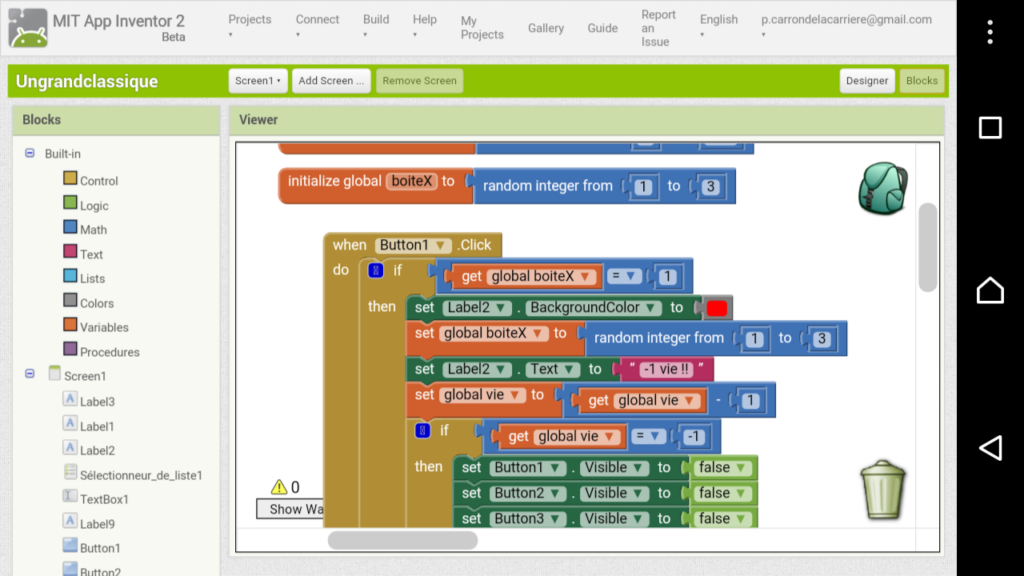
To start creating an application using MIT App Inventor, you can access the official website at https://appinventor.mit.edu/ and click on the "Create Apps" option.
The site will then offer a series of tutorials to guide you according to the purpose of your application.
When choosing a tutorial, click on "Go to tutorial", and the development environment will open. You also have the option of starting a new blank project.
In the left sidebar, you'll find a menu with various options that you can add to your application, such as buttons, checkboxes, images, sliders, text boxes and more.
To include any of these elements, simply drag the desired menu option onto the layout of your application.
You can find MIT App Inventor tutorials on their official YouTube channel.
There you will find videos in English explaining how to use this tool.
Para acessar esses tutoriais, basta visitar o seguinte no YouTube: MIT App Inventor
See also how the Digital Wallet app works: Aqui! Any questions? Leave them in the comments below!
